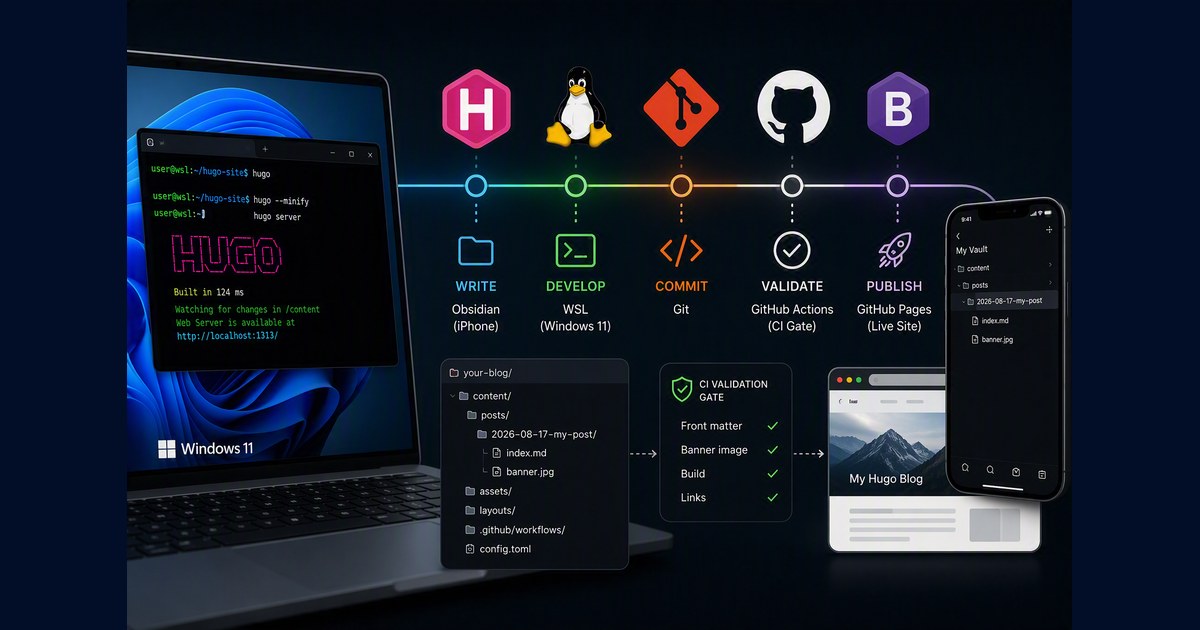
This is the whole pipeline I use to write and publish a Hugo blog from Linux (including WSL on Windows 11): repo layout, scaffolding, banner handling, a validation gate in CI, and one command to publish. It also covers writing from an iPhone, because the moment a second device exists most of the interesting failures appear.
It replaces an earlier setup of mine that used an Obsidian vault on Windows and an rsync script. That approach is fine for one device — the original post still stands if that is you — but it silently deleted a section from a published post once I added a phone. That failure shaped everything below.
The Architecture
Two working copies, both git clones of the same repo:
iPhone (Obsidian + Obsidian Git)          Laptop (Linux / WSL)
┌────────────────────────────┐            ┌────────────────────────────┐
│ vault = git clone          │            │ ~/hugo-site = git clone    │
│   content/posts/           │            │   content/posts/           │
│     2026-08-17-my-post/    │            │     2026-08-17-my-post/    │
│       index.md             │            │       index.md             │
│       banner.jpg           │            │       banner.jpg           │
└─────────────┬──────────────┘            └─────────────┬──────────────┘
              │ push/pull (HTTPS + PAT)                 │ push/pull (SSH)
              └──────────────────┬──────────────────────┘
                                 ▼
                    GitHub: your-blog repo
                    Actions: validate → build
                    Pages:   live site
Git is the only sync mechanism. Edit the same post on both devices and you get a merge conflict you can see and resolve.
The rule that produces this shape:
If a copy of your content is not a git clone, it will eventually overwrite one that is.
My old script had three copies and only two were clones. The Windows vault was maintained solely by rsync:
# repo → vault: bring in posts written elsewhere
rsync -av --ignore-existing "$HUGO_POSTS/" "$VAULT/"

# vault → repo: vault is the source of truth for local edits
rsync -av --delete --exclude='.obsidian' "$VAULT/" "$HUGO_POSTS/"
--ignore-existing copies only files the vault does not already have, so a new post from the phone arrived but a modified one was skipped — the file existed on both sides. --delete then made the stale vault copy authoritative and overwrote the repo. Twenty lines vanished from a live post with no error and nothing in git status. New posts survived, edits did not, which made it look random rather than systematic.
rsync compares filenames and timestamps; it cannot tell “newer” from “correct”. Git can, because it knows which version descends from which.
The trade-off of dropping the mirror is explicit: no Obsidian on the laptop (unless you clone the repo into a path Obsidian can reach and run Obsidian Git there too). On the laptop you write in whatever editor you already use — vim, VS Code, or Obsidian if the repo lives on a native filesystem it can watch. Either layout obeys the rule: every copy must be a git clone.
Setup
Hugo. Skip the package manager, which drags in a Go toolchain. Take the prebuilt binary from the releases page and keep the single executable in your workspace:
./hugo version
The repo. Clone into your home directory. If you are on WSL, that means the Linux filesystem — not /mnt/c — since Hugo’s file watcher and git are both markedly faster on the native filesystem:
cd ~ && git clone git@github.com:yourname/your-blog.git hugo-site
cd hugo-site && git submodule update --init --recursive   # theme
Line endings. This matters when multiple operating systems touch the same repo (Windows + Linux, or macOS + Linux). Without it, a shell script committed from Windows reaches CI with CRLF and fails with a misleading bad interpreter. In .gitattributes:
* text=auto eol=lf
*.md  text eol=lf
*.sh  text eol=lf
*.yml text eol=lf
*.png binary
*.jpg binary
Ignores. In .gitignore:
/public/
/resources/
.hugo_build.lock
.obsidian/
/banners/
That last one is the local archive of full-resolution banners — more on it below.
Scaffolding a Post
A Hugo page bundle is a folder holding index.md plus its images. Hand-building one invites front matter typos, so scripts/new-post.sh does it:
./scripts/new-post.sh "My Post Title"
./scripts/new-post.sh "My Post Title" --tags hugo,wsl --banner ~/Downloads/img.png
./scripts/new-post.sh "My Post Title" --slug short-name
./scripts/new-post.sh "My Post Title" --publish
It slugifies the title, creates content/posts/YYYY-MM-DD-slug/, writes the front matter, and runs the banner through the fitter if you pass one.
By default the URL is derived from the title, which is fine until the title runs long — this post would otherwise have landed at 2026-08-23-the-complete-hugo-blogging-pipeline/. --slug decouples the two:
./scripts/new-post.sh "The Complete Hugo Blogging Pipeline on Windows 11 WSL" \
  --slug hugo-pipeline
Short URL, full title on the page and in the social card. It also means retitling later never tempts you into renaming the folder, so links you have already shared keep working. An explicit slug is normalised the same way a derived one is, and you are told when it changes.
Posts default to draft = true. The two failure modes are asymmetric: publishing half a post is visible and fixable in a minute, whereas forgetting to flip a draft means the post never appears and gives you no signal at all — so the default guards the confusing one, and --publish opts out.
One detail worth stealing, because it fails as a build error rather than a typo. TOML has two string forms, and the single-quoted literal form cannot contain an apostrophe — there is no escape for it. title = 'Google's Spark' is a parse error. So emit a literal string normally and switch to a double-quoted basic string when the title needs it:
if [[ "$TITLE" == *"'"* ]]; then
    TITLE_TOML="\"$(esc_basic "$TITLE")\""   # "Google's Spark"
else
    TITLE_TOML="'$TITLE'"                    # 'Plain Title'
fi
Banners
Social platforms render link previews near 1.91:1, and 1200×630 is the standard size. This matters more than it looks, because og:image points at your original file — the theme’s responsive srcset only affects on-page display, not the card.
Two consequences. A 2 MB PNG is re-fetched by every platform that scrapes the link. And a 1.50:1 image — a common AI output ratio — loses roughly a fifth of its height to centre-cropping, which is exactly where a title or footer usually sits.
scripts/fit-banner.py normalises to 1200×630 and picks its method per image:
./scripts/fit-banner.py ~/Downloads/img.png content/posts/my-post/banner.jpg
- crop when the source ratio is already close, e.g. 16:9 — minimal loss
- pad when it is not, using a colour sampled from the image border, so nothing is cut
- never upscale, since a 1024px source gains no detail from being stretched to 1200
It also archives the full-resolution source to banners/originals/<slug>-banner.<ext> before writing the downscaled copy. AI-generated art cannot be regenerated identically, so the card image must not be the only copy. That folder is gitignored — the originals stay on the laptop, and posts written on the phone commit their full-resolution image anyway.
Format follows content: PNG for flat graphics and diagrams, JPEG for photographic art. The difference is not subtle — one of my banners went from 599 KB as a fitted PNG to 79 KB as JPEG. Across the whole site, converting five old banners took total weight from about 8.2 MB to 0.66 MB.
For a sweep rather than one file:
./scripts/fit-banner.py --scan --dry-run    # what needs adjusting
./scripts/fit-banner.py --scan              # archive, fit, rewrite front matter
--scan skips covers already within limits, and for the rest archives the original, writes a fitted banner.jpg, updates the front matter and removes the old file. The dry run exits 2 when work is pending, which is what lets publish.sh ask you about it. This is the command for after publishing from a phone, where nothing resizes anything.
The Validation Gate
Here is the bug that motivated all of this. The following front matter builds cleanly, renders perfectly in a browser, and produces a social card with no banner:
[params.cover]
  image = "banner.jpg"
  alt = "My Post"
PaperMod resolves a cover differently depending on one flag:
{{- if (ne .Params.cover.relative true) }}
  <meta property="og:image" content="{{ .Params.cover.image | absURL }}">
{{- else}}
  <meta property="og:image" content="{{ (path.Join .RelPermalink .Params.cover.image) | absURL }}">
{{- end}}
Without relative = true, the filename resolves against the site root instead of the page bundle, so og:image points at a URL that does not exist. The page still looks right, because the visible cover comes from a different partial that resolves the image from the bundle and ignores relative entirely. Only the crawler sees the 404.
hugo build cannot catch this — the HTML is valid, it just points somewhere empty. So scripts/check-posts.sh runs in CI ahead of the build:
- name: Validate posts
  run: ./scripts/check-posts.sh
- name: Build
  run: hugo --minify --baseURL "https://yourname.github.io/your-repo/"
It fails on a cover whose file is missing, or a cover without relative = true. It warns on a banner over 500 KB, outside 1.7–2.1:1, or under 600px wide — quality issues, not broken deploys. It lists drafts rather than skipping them silently, because a post accidentally left at draft = true gives no other signal:
DRAFT 2026-08-24-half-written: draft = true — will NOT be published.
Running it in Actions rather than a local git hook is the important decision. Posts pushed from the phone never touch your laptop tooling. A pre-push hook would guard only the machine where you already have scripts, a terminal and a preview server. Put the gate where every device’s commits must pass, and it covers all of them.
Warnings are also kept meaningful by fixing them: eight permanent warnings train you to ignore the output, so the next real one is invisible.
Publishing
./publish.sh "new post - my post title"
That runs: git pull --rebase → banner scan → validate → build → commit → push. The banner scan is a dry run that asks before changing anything, so a banner you dropped in by hand or one that arrived from the phone gets caught without files being rewritten behind your back. Declining still publishes, since an oversized banner is a quality issue. There is no prompt when stdin is not a terminal, so nothing hangs in a non-interactive run.
Plain git works too, and the pull is not optional:
git pull --rebase origin main
git add -A && git commit -m "new post - my post title" && git push origin main
Anything written on the phone is already on GitHub; skip the pull and you earn a rejected non-fast-forward push. That is git protecting you — precisely the protection rsync never offered.
Where each path leaves your banner:
| How the banner is added | Fitted? |
|---|---|
new-post.sh --banner | automatically |
by hand, published with publish.sh | prompted |
| by hand, published with plain git | no — warned at scaffold time, warned again in CI |
| written on the phone | no — the next publish.sh prompts |
Preview
hugo server -D # http://localhost:1313/
-D renders drafts. Production builds omit them, so a post left at draft = true looks fine here and is absent from the live site — which is why the validator lists drafts out loud.
Testing a Social Card
Never judge a card fix by re-sharing the same link. X and LinkedIn cache card metadata per URL for roughly a week, including failures, so a working fix can look broken and a broken page can look fixed. I lost a morning to exactly this.
Verify the page, not the platform:
curl -s <post-url> | grep -oE '<meta (property="og:image"|name=twitter:image)[^>]*>'
curl -s -o /dev/null -w "%{http_code}\n" <that-image-url>
If the second command prints 404, no amount of cache-busting will help. When the tags are right and you want a fresh scrape, use a throwaway query string:
https://yourname.github.io/your-repo/posts/my-post/?v=2
The Full Stack
new-post.sh              — scaffold the page bundle, fit the banner
$EDITOR                  — write markdown
fit-banner.py            — normalise banners, archive originals
hugo server -D           — preview, drafts included
publish.sh               — pull, scan, validate, build, push
git                      — the ONLY sync mechanism, both directions
GitHub Actions           — validate front matter, then build
GitHub Pages             — serve the site
Three lessons, in order of how much time each would have saved me.
Count your copies and check each has a .git. Three copies with two clones is not an extra backup, it is an unmanaged writer with authority over your content.
Distrust --delete in anything you run habitually. It turns a stale directory into an instruction to remove work.
Put safety checks where every device pushes through. Local hooks protect the machine you were already careful on.
No database. No CMS login. No block editor. And no unmanaged copy of your content waiting to overwrite the good one.